Warning: Attempt to read property "ID" on null in /home/marvioco/d.marvio.co/wp-content/plugins/elementor/core/base/document.php on line 356
Warning: Attempt to read property "ID" on null in /home/marvioco/d.marvio.co/wp-content/plugins/elementor/core/base/document.php on line 356 WordPress - MarviO Digital
We guarantee you premium support for every customer of MarviO Digital. Trust us, we know from first hand the true meaning of the word “Support”.
ADDRESS:
Jl. Danau Beratan VI No.2A, Jimbaran – BALI, 80361 Indonesia
Learn how to use WordPress to create, manage, and customize your website easily, even without advanced coding skills.
Introductions
What is WordPress?
WordPress is a popular Content Management System (CMS) that allows users to create, manage, and customize websites easily without advanced coding skills. It provides a wide range of themes, plugins, and built-in tools for designing websites, managing content, adding features, and improving functionality. WordPress can be used for various purposes, including blogs, portfolios, business websites, online stores, news sites, and more
Dashboard
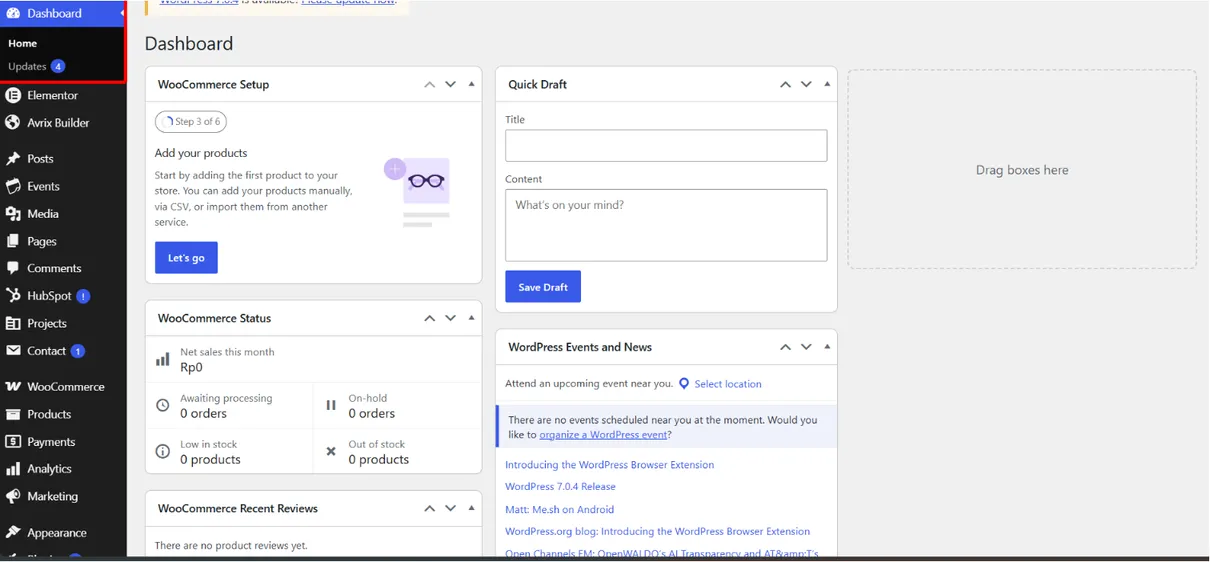
The Dashboard is WordPress main control center for managing your website, content, settings, and monitoring daily website.
Posts
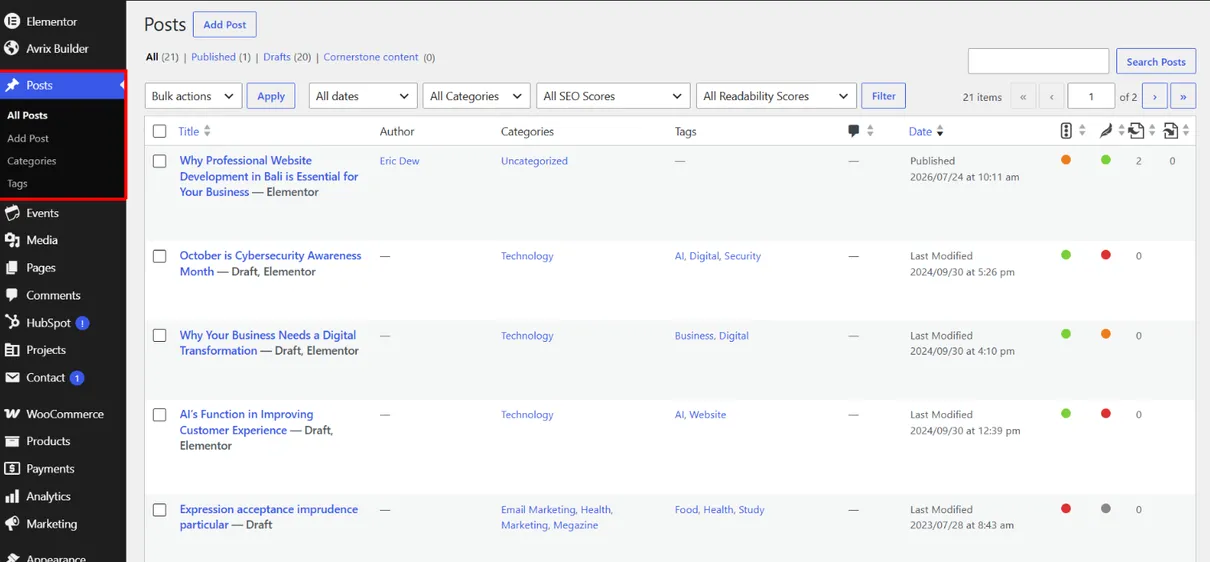
Posts are used to create, manage, and publish website content such as articles, news, updates, and other regular online entries.
Media
Media is used to upload, organize, and manage website files such as images, videos, audio, and documents for easy access.
Pages
Pages are used to create and manage static website content such as Home, About, Contact, and other important information pages.
Comments
Comments let visitors leave feedback or questions on your website content for administrators to review and manage.
Appearance
Appearance controls your website’s design, including themes, menus, widgets, and customization options.
Plugins
Plugins add new features and functions to WordPress without requiring changes to the website’s core system.
Users
Users manages website accounts, roles, and permissions, allowing administrators to control access and user activities.
Tools
Tools provide useful features for managing, importing, exporting, and maintaining your WordPress website.
Settings
Settings controls your website’s general configuration, including site information, reading, writing, discussion, and other preferences.
1. Dashboard
Your Website Control Center
The WordPress Dashboard is the main control center of your website. It provides an overview of your site and gives you quick access to essential tools for managing content, pages, media, comments, users, plugins, themes, settings, and updates. From the Dashboard, you can monitor your website, make changes, and manage different aspects of your site in one convenient place.
2. Posts
Create and Manage WordPress Posts
WordPress Posts are used to create and publish regular content such as blog articles, news, updates, and other website content. From the Posts section, you can create, edit, publish, schedule, or delete posts, while organizing them with categories and tags. This helps keep your content structured, easy to navigate, and easier for visitors and search engines to discover.
Add and Manage Posts in WordPress
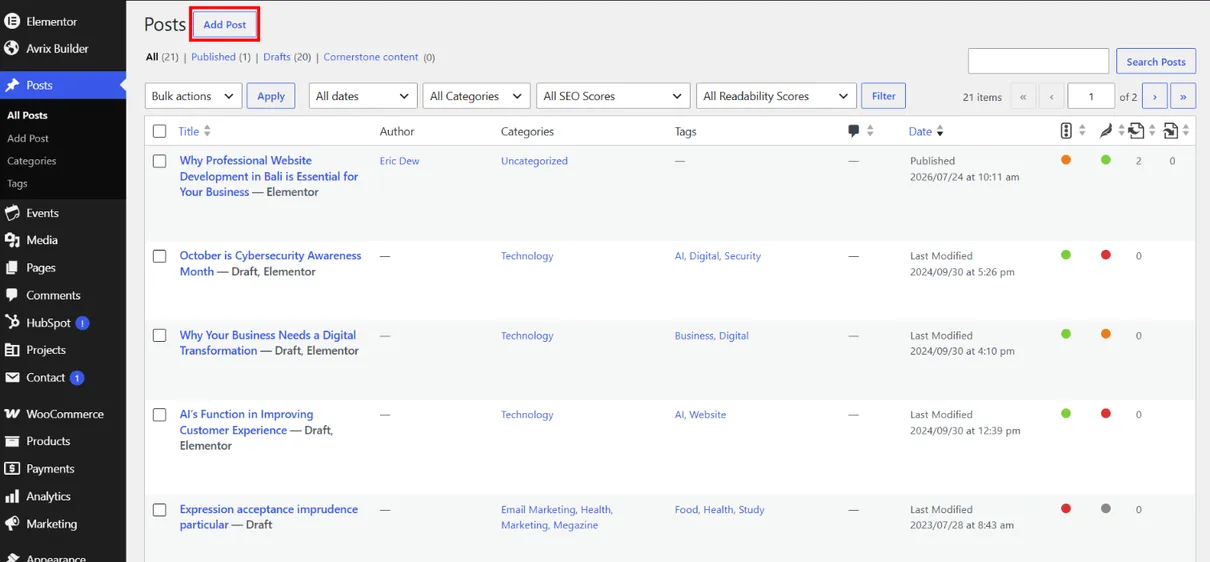
Click the Add New button to add a new post.
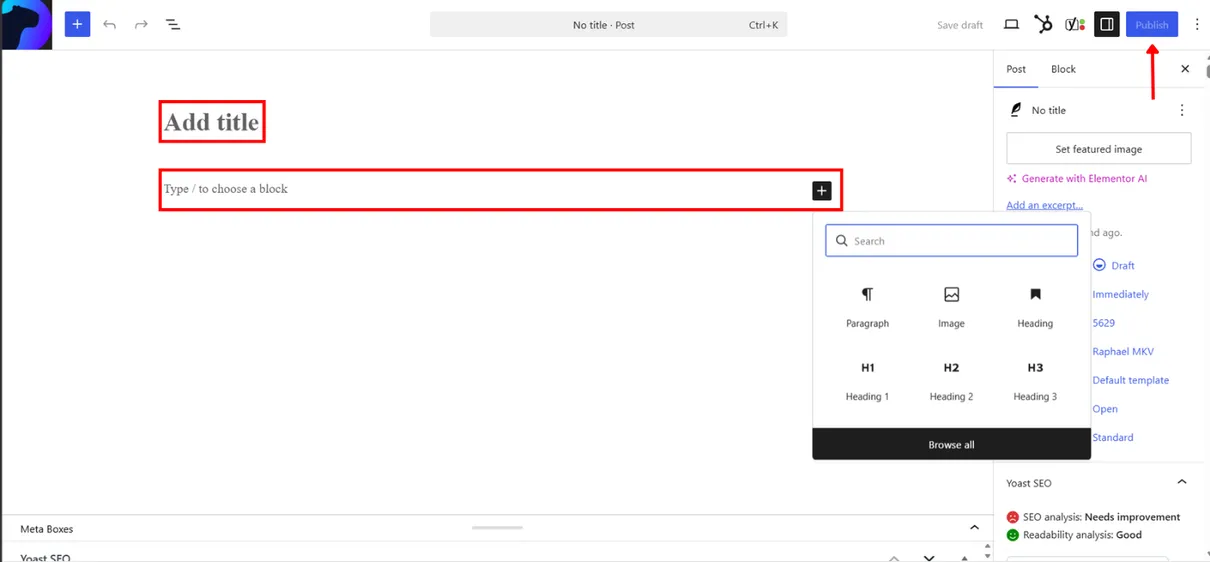
Next, you’ll give your post a title. Click on it and add the text.
To add content, click the plus icon at the top left of the screen
Then click The publish button to make your post live
3. Media
Upload and Manage Your Media
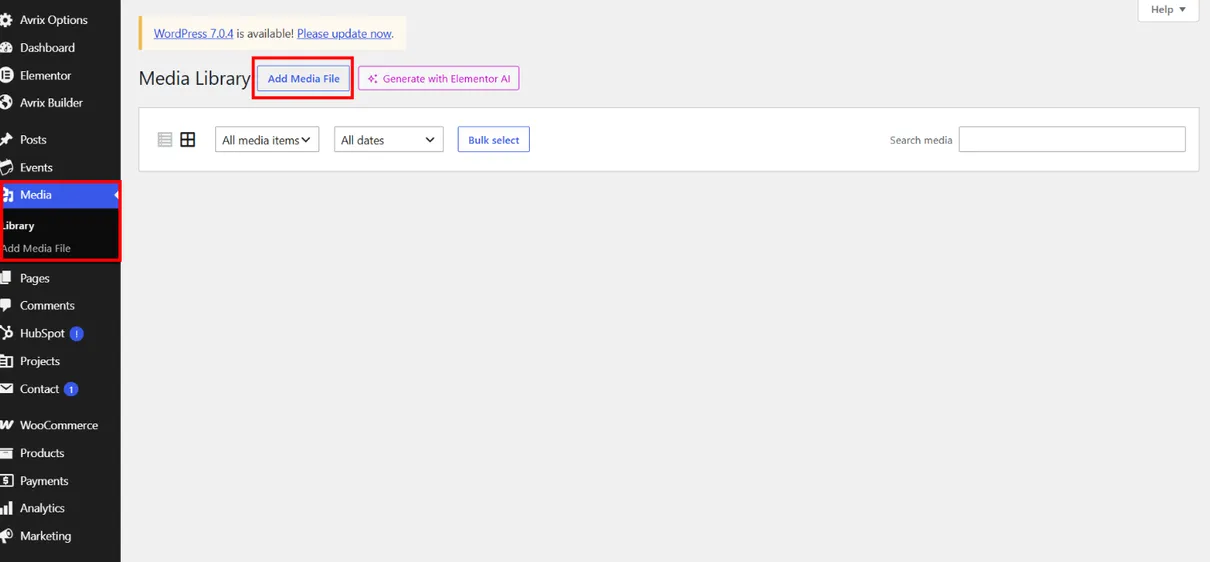
The Media Library is where you can upload, store, organize, and manage visual content such as images, videos, audio files, and documents. You can easily add media to your posts and pages, edit basic image details, and manage your files from one central location. Keeping your media organized helps maintain a clean and efficient WordPress website.
4. Pages
Create and Manage Website Pages
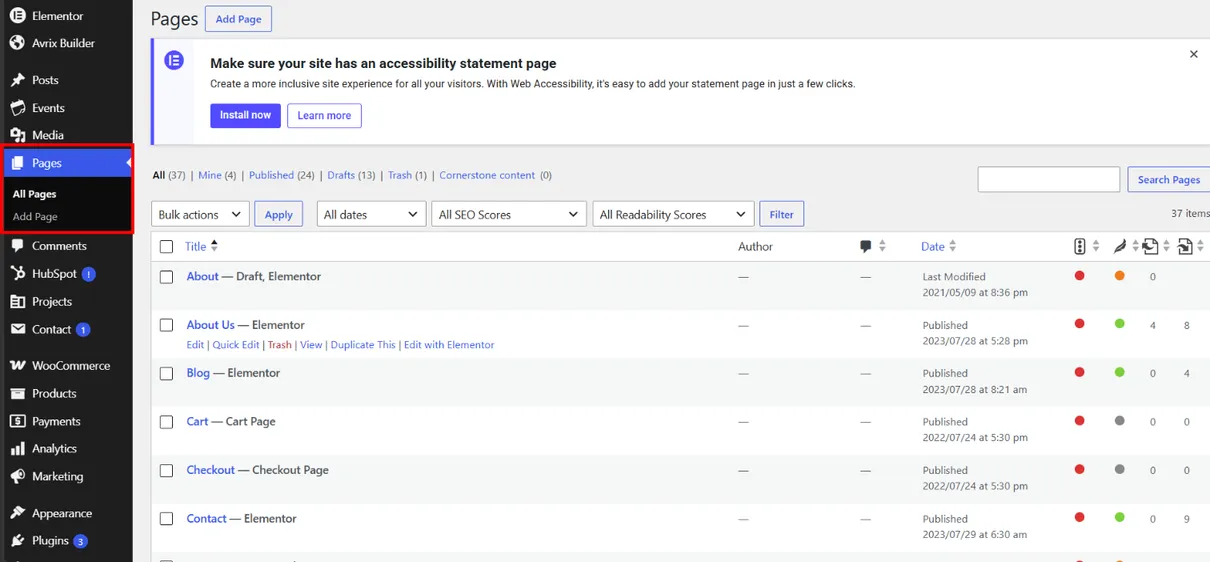
Pages are used to create and display important website content that does not change frequently, such as Home, About Us, Services, and Contact pages. From the Pages section, you can create, edit, publish, update, or delete pages and organize your website’s main content.
Add and Manage Pages in WordPress
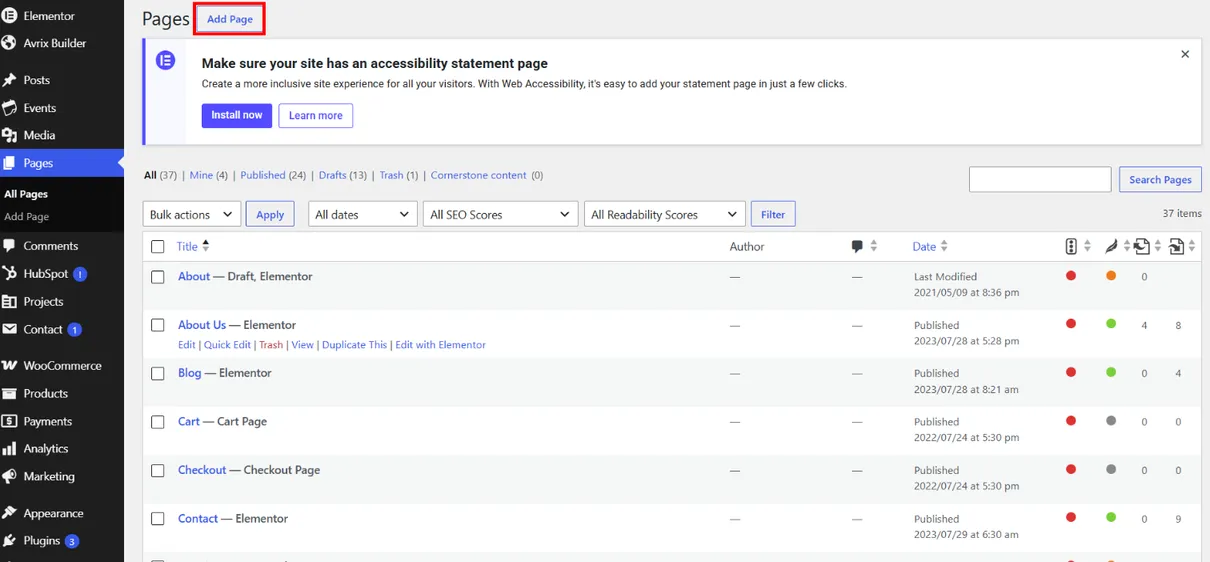
Click the Add New button to add a new pages.
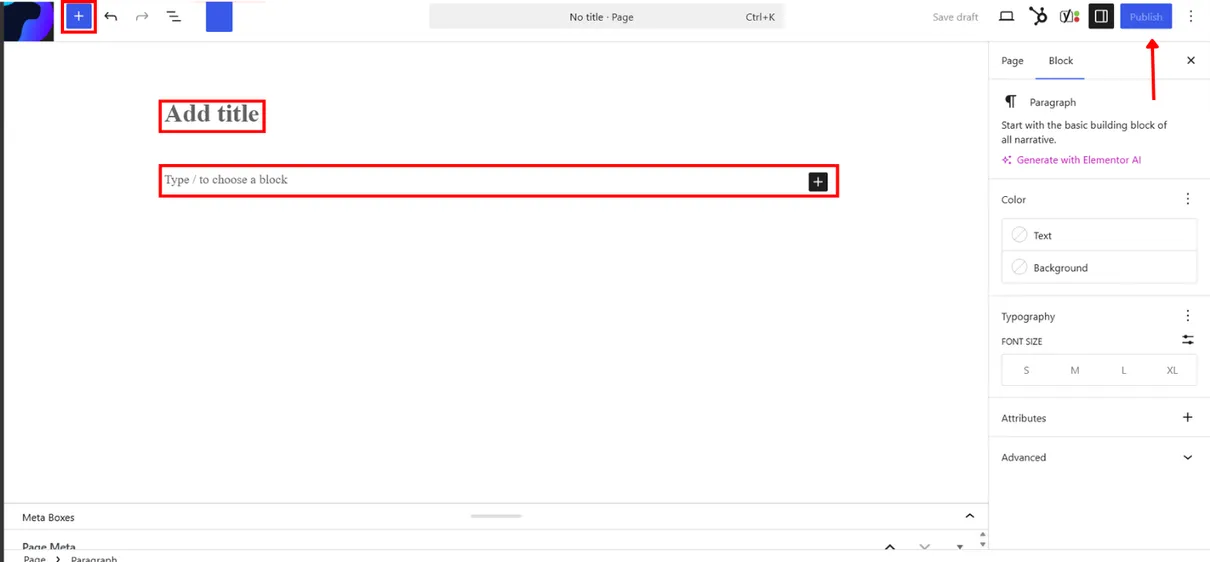
Add a Page Title Enter a clear title for your page, such as Home, About Us, Services, or Contact.
Add Your Page Content Click the “+” button to add blocks, then insert text, images, headings, buttons, or other content you need.
Then click The publish button to make your pages live
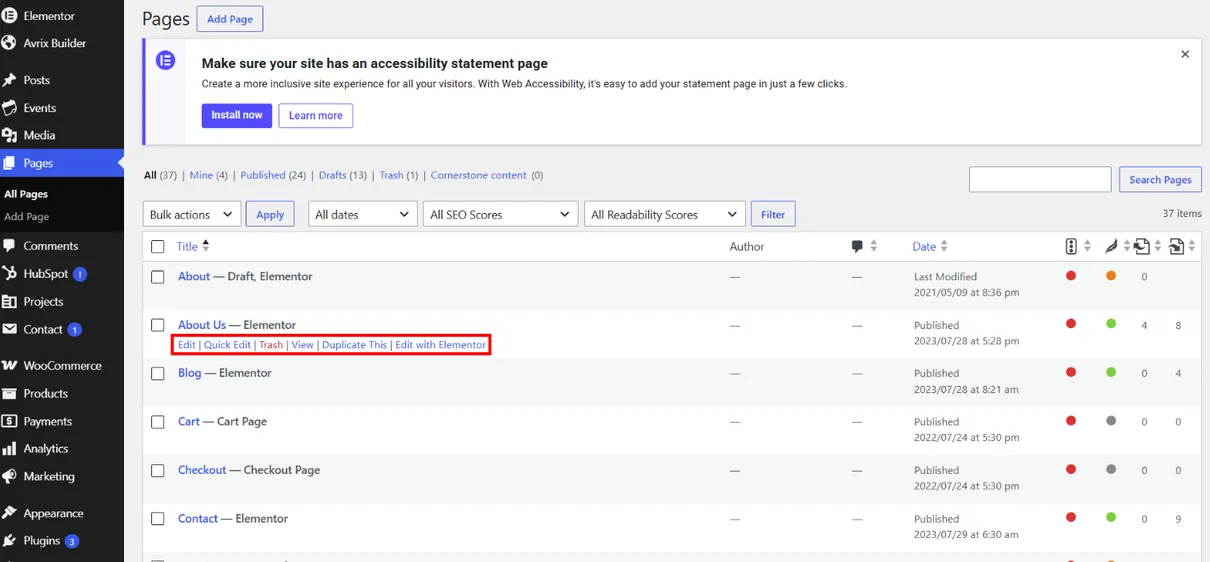
Hover over an existing page to access options such as Edit, Quick Edit, View, Duplicate, or Trash. Choose the appropriate option to manage or update your page.
5. Comments
Manage and Moderate Website Comments
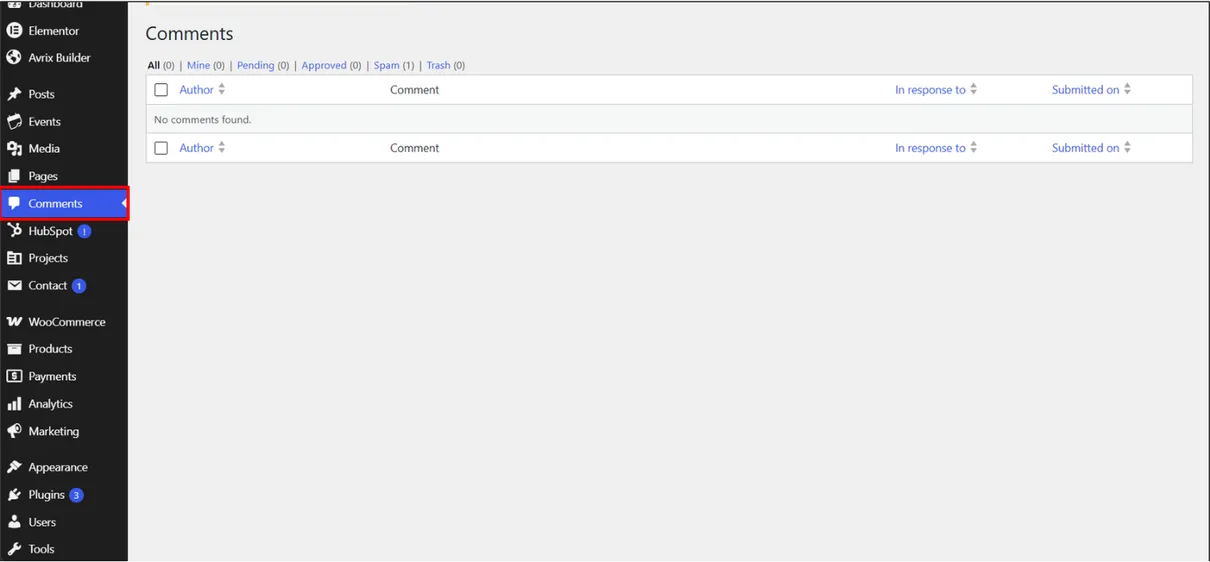
WordPress Comments allow visitors to share feedback and interact with your posts, creating opportunities to increase website engagement. From the Comments section, you can review, approve, reply to, edit, mark as spam, or delete comments to keep discussions relevant and your website well managed.
6. Appearance
Customize Your WordPress Website
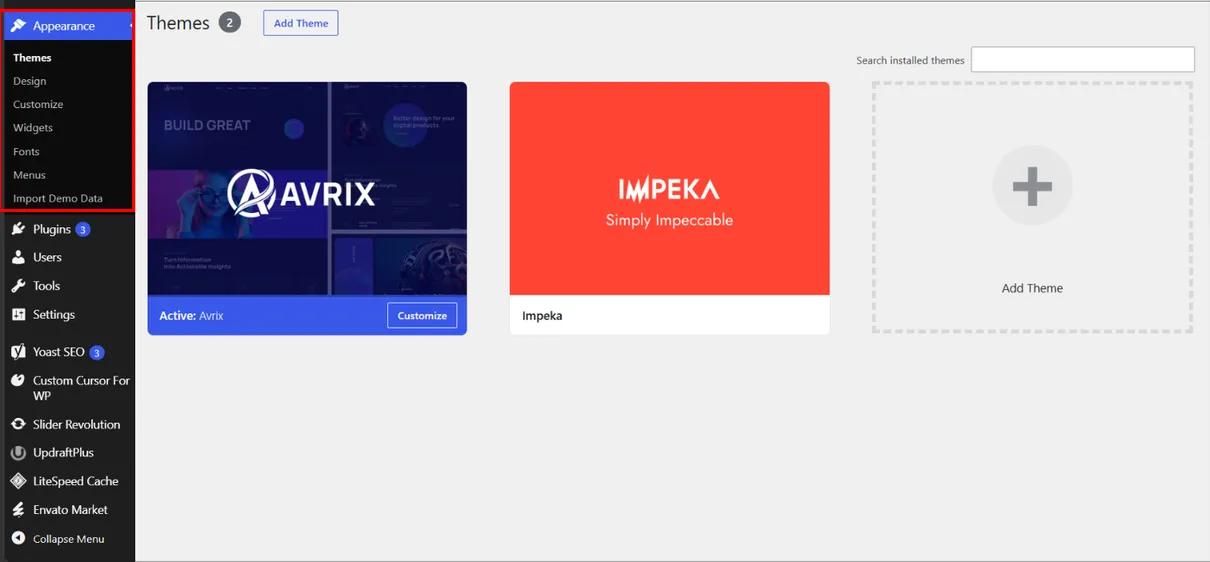
The WordPress Appearance section allows you to customize your website’s design, layout, and visual elements. It provides access to themes, menus, widgets, and other customization options that help create a consistent and user-friendly website. Themes are especially important because they control the overall design and structure of your WordPress site.
Install and Activate a WordPress Theme
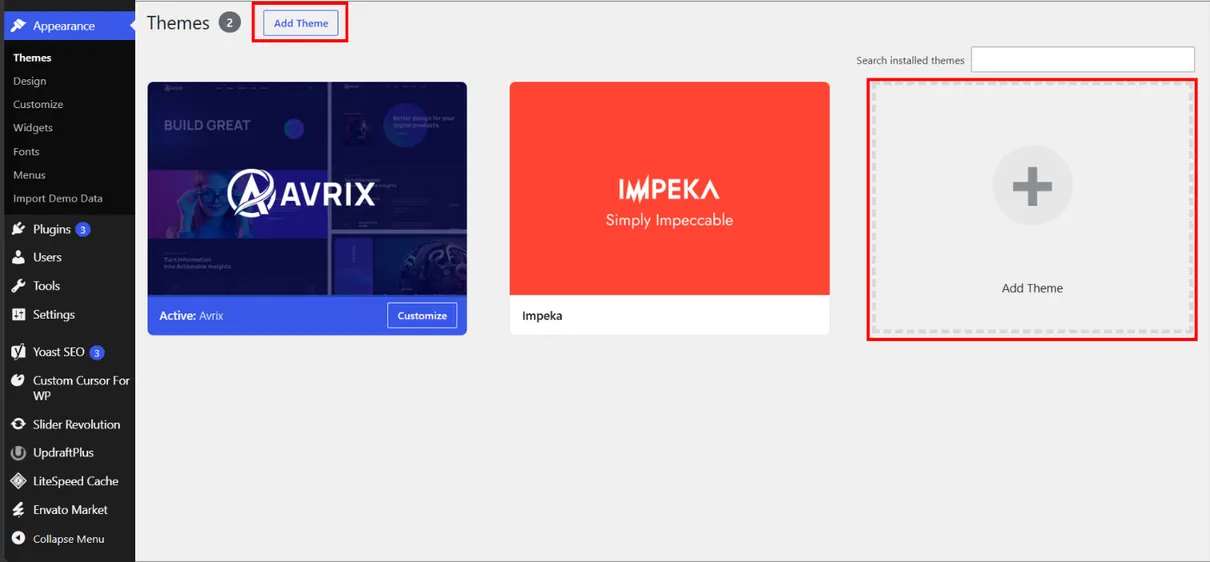
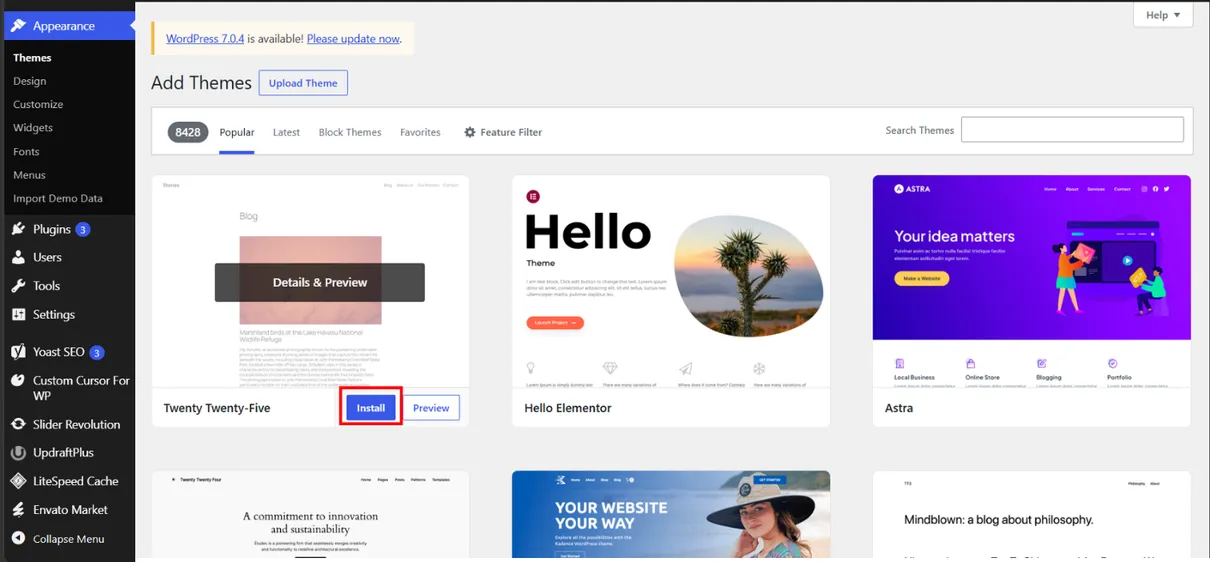
Go to Appearance → Themes and click “Add New” to browse the available WordPress themes. Choose a theme that matches your website’s design and requirements.
Browse or search for a suitable theme, then click “Install” to add the selected WordPress theme to your website. Wait for the installation to complete before activating it.
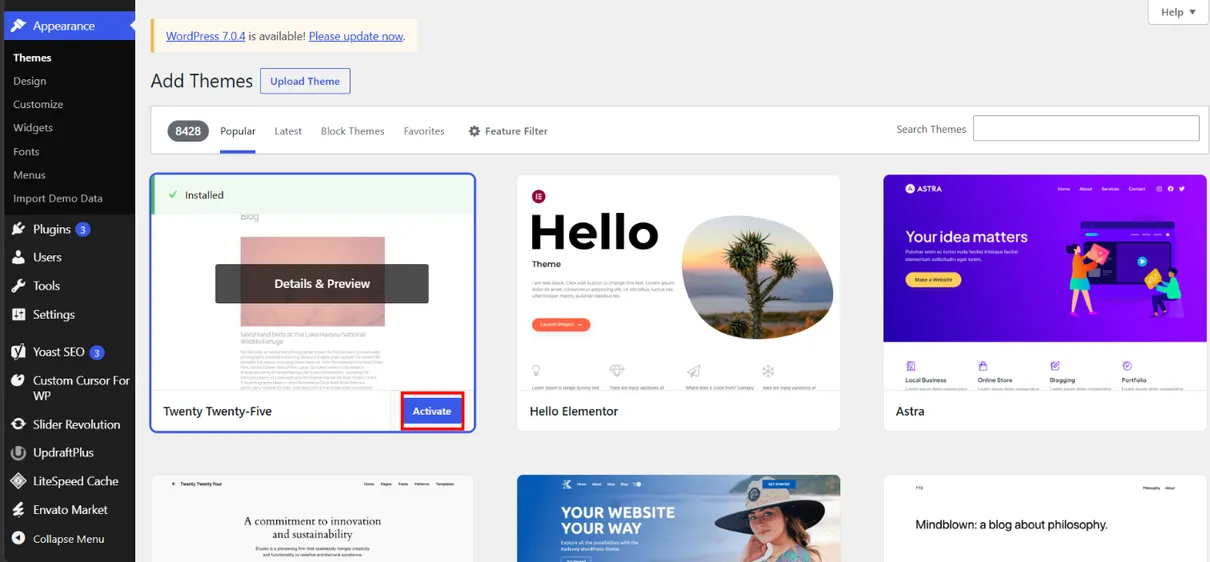
After installing a WordPress theme, click “Activate” to apply it to your website. A theme controls the overall design, layout, colors, fonts, and visual style of your site, which you can customize to match your brand and content.
7. Plugins
Extend Your WordPress Website with Plugins
WordPress plugins add new features and functionality to your website without requiring advanced coding. They can be used for SEO, security, forms, e-commerce, performance, page building, and many other purposes, allowing you to expand your website based on your needs.
Install and Activate a WordPress Plugins
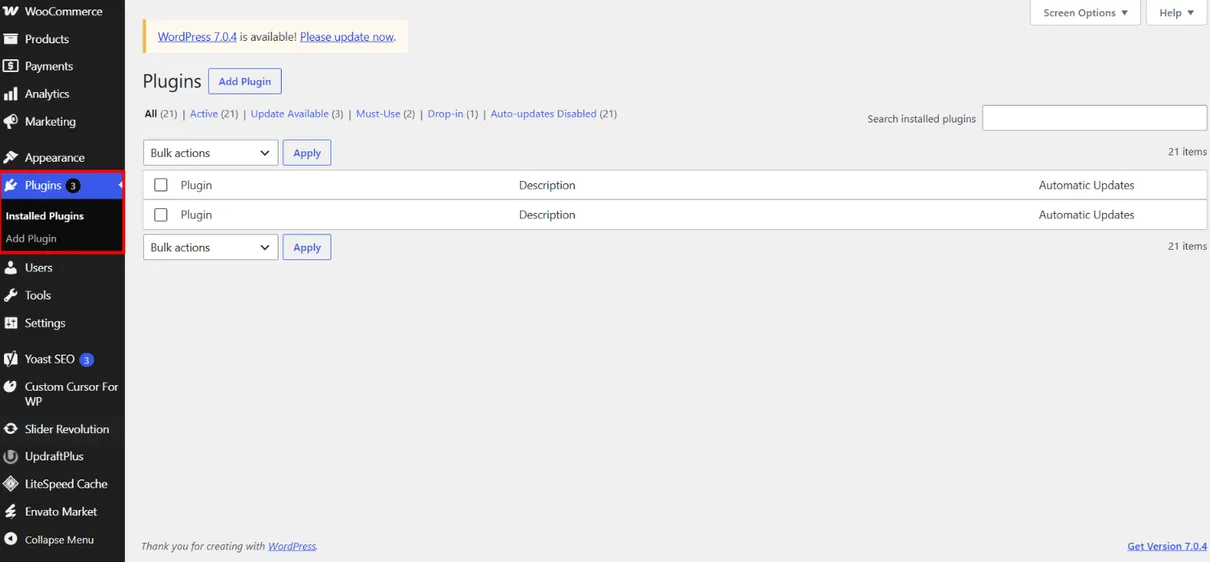
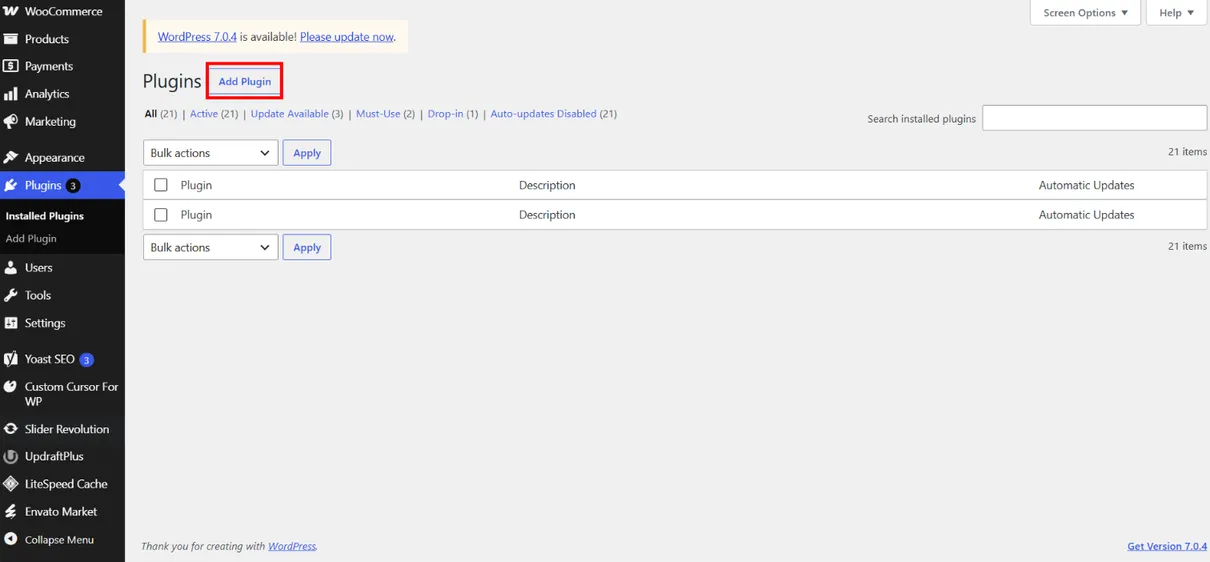
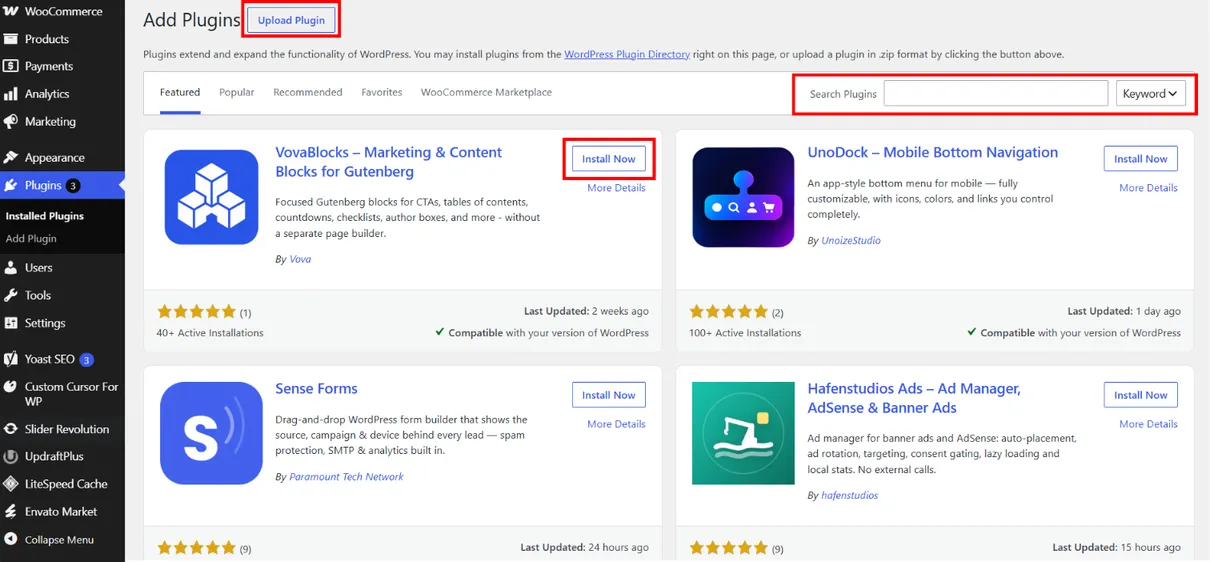
Go to “Plugins” from the WordPress dashboard and click “Add New Plugin” to browse the available plugins.
Upload a plugin file or search for a plugin that meets your website’s needs. Once you find the right plugin, click “Install Now” to add it to your WordPress website.
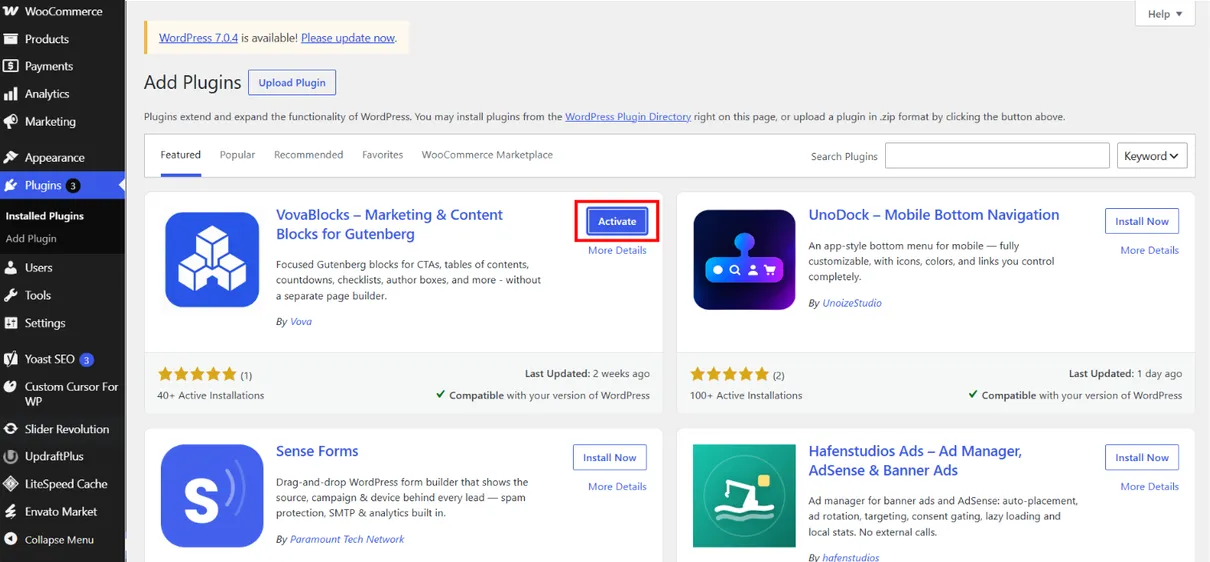
Once the installation is complete, click “Activate” to enable the plugin and make its features available on your website.
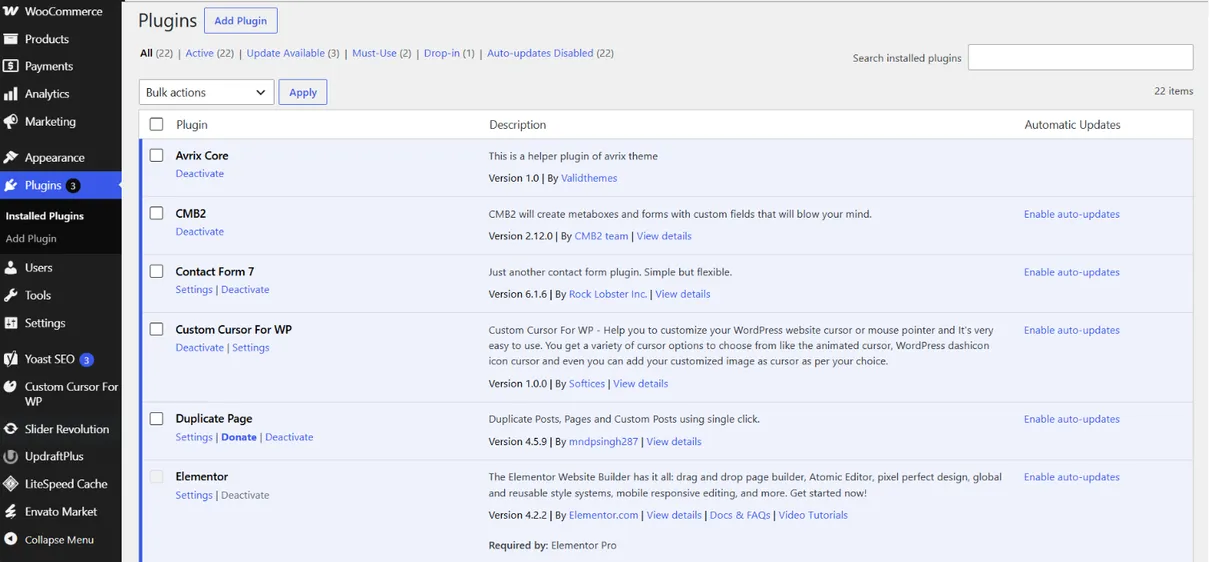
After activation, you can manage the plugin from the Plugins section. Depending on the plugin, you may need to configure its settings to use its features on your website.
8. Users
Manage WordPress Users and User Roles
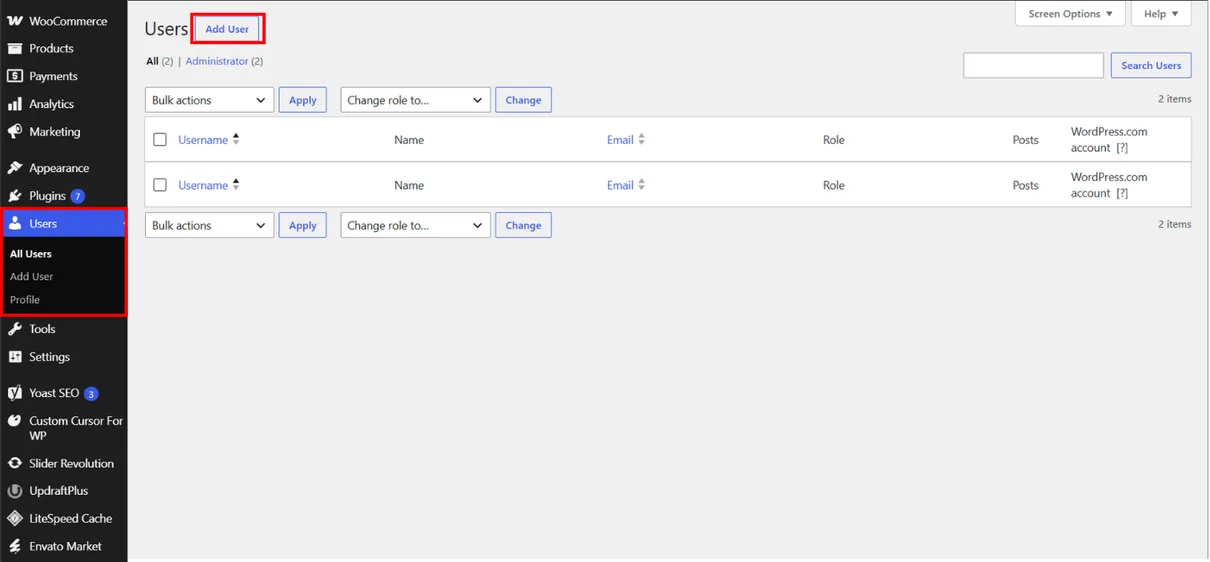
The Users section allows you to manage people who have access to your WordPress website. You can add new users, edit user information, remove accounts, and assign different roles such as Administrator, Editor, Author, Contributor, or Subscriber. User roles help control what each person can access and manage on your website.
Add a New User in WordPress
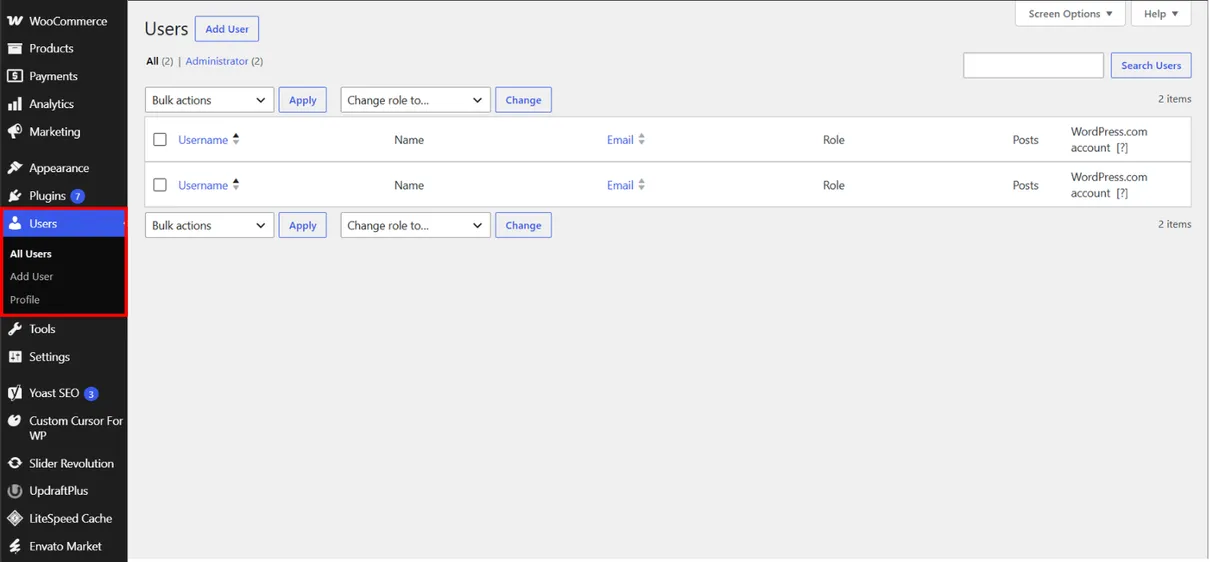
Go to “Users” from the WordPress dashboard and select “Add New User” to create a new user account for your website.
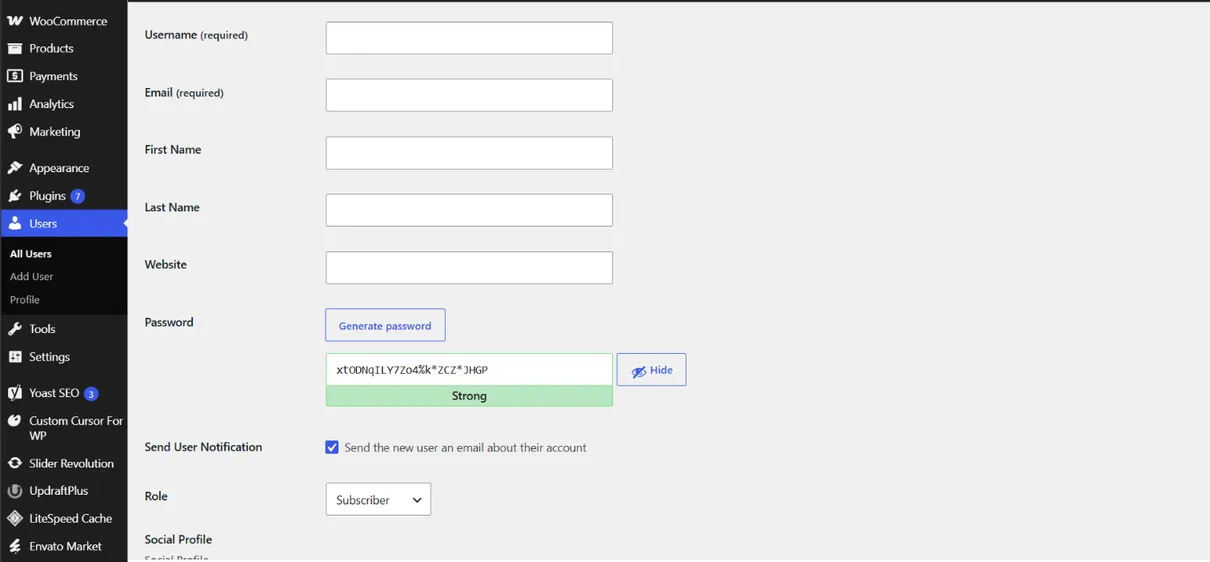
Enter the required user details, including the username, email, first and last name, and password. Then select an appropriate user role to control the permissions and access they have on your WordPress website.
9. Tools
Manage and Maintain Your WordPress Website
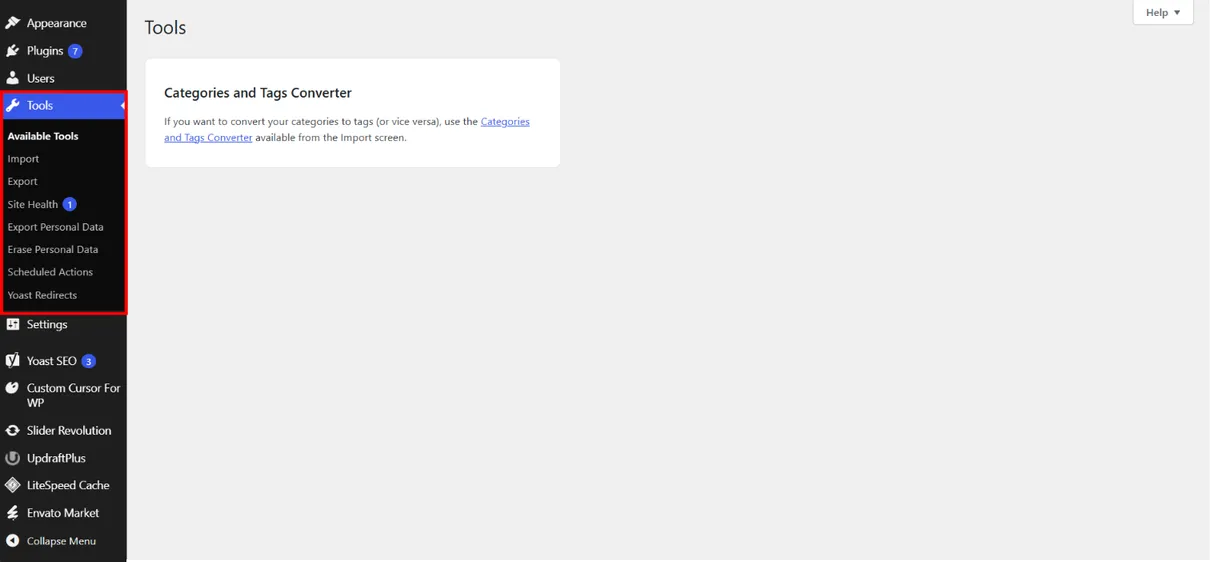
The WordPress Tools section provides useful features for managing and maintaining your website. You can import or export content, monitor site health, manage personal data, and perform other administrative tasks to help keep your WordPress website organized and running properly.
10. Settings
Configure Your WordPress Website Settings
The WordPress Settings section allows you to configure important options that control how your website works and behaves. You can manage your site title, URL, timezone, language, reading and writing preferences, discussion settings, and other core website options to ensure WordPress is configured according to your needs.
Learn how to use WordPress to create, manage, and customize your website easily, even without advanced coding skills.
Introductions
What is WordPress?
WordPress is a popular Content Management System (CMS) that allows users to create, manage, and customize websites easily without advanced coding skills. It provides a wide range of themes, plugins, and built-in tools for designing websites, managing content, adding features, and improving functionality. WordPress can be used for various purposes, including blogs, portfolios, business websites, online stores, news sites, and more
Dashboard
The Dashboard is WordPress main control center for managing your website, content, settings, and monitoring daily website.
Posts
Posts are used to create, manage, and publish website content such as articles, news, updates, and other regular online entries.
Media
Media is used to upload, organize, and manage website files such as images, videos, audio, and documents for easy access.
Pages
Pages are used to create and manage static website content such as Home, About, Contact, and other important information pages.
Comments
Comments let visitors leave feedback or questions on your website content for administrators to review and manage.
Appearance
Appearance controls your website’s design, including themes, menus, widgets, and customization options.
Plugins
Plugins add new features and functions to WordPress without requiring changes to the website’s core system.
Users
Users manages website accounts, roles, and permissions, allowing administrators to control access and user activities.
Tools
Tools provide useful features for managing, importing, exporting, and maintaining your WordPress website.
Settings
Settings controls your website’s general configuration, including site information, reading, writing, discussion, and other preferences.
1. Dashboard
Your Website Control Center
The WordPress Dashboard is the main control center of your website. It provides an overview of your site and gives you quick access to essential tools for managing content, pages, media, comments, users, plugins, themes, settings, and updates. From the Dashboard, you can monitor your website, make changes, and manage different aspects of your site in one convenient place.
2. Posts
Create and Manage WordPress Posts
WordPress Posts are used to create and publish regular content such as blog articles, news, updates, and other website content. From the Posts section, you can create, edit, publish, schedule, or delete posts, while organizing them with categories and tags. This helps keep your content structured, easy to navigate, and easier for visitors and search engines to discover.
Add and Manage Posts in WordPress
Click the Add New button to add a new post.
Next, you’ll give your post a title. Click on it and add the text.
To add content, click the plus icon at the top left of the screen
Then click The publish button to make your post live
3. Media
Upload and Manage Your Media
The Media Library is where you can upload, store, organize, and manage visual content such as images, videos, audio files, and documents. You can easily add media to your posts and pages, edit basic image details, and manage your files from one central location. Keeping your media organized helps maintain a clean and efficient WordPress website.
4. Pages
Create and Manage Website Pages
Pages are used to create and display important website content that does not change frequently, such as Home, About Us, Services, and Contact pages. From the Pages section, you can create, edit, publish, update, or delete pages and organize your website’s main content.
Add and Manage Pages in WordPress
Click the Add New button to add a new pages.
Add a Page Title Enter a clear title for your page, such as Home, About Us, Services, or Contact.
Add Your Page Content Click the “+” button to add blocks, then insert text, images, headings, buttons, or other content you need.
Then click The publish button to make your pages live
Hover over an existing page to access options such as Edit, Quick Edit, View, Duplicate, or Trash. Choose the appropriate option to manage or update your page.
5. Comments
Manage and Moderate Website Comments
WordPress Comments allow visitors to share feedback and interact with your posts, creating opportunities to increase website engagement. From the Comments section, you can review, approve, reply to, edit, mark as spam, or delete comments to keep discussions relevant and your website well managed.
6. Appearance
Customize Your WordPress Website
The WordPress Appearance section allows you to customize your website’s design, layout, and visual elements. It provides access to themes, menus, widgets, and other customization options that help create a consistent and user-friendly website. Themes are especially important because they control the overall design and structure of your WordPress site.
Install and Activate a WordPress Theme
Go to Appearance → Themes and click “Add New” to browse the available WordPress themes. Choose a theme that matches your website’s design and requirements.
Browse or search for a suitable theme, then click “Install” to add the selected WordPress theme to your website. Wait for the installation to complete before activating it.
After installing a WordPress theme, click “Activate” to apply it to your website. A theme controls the overall design, layout, colors, fonts, and visual style of your site, which you can customize to match your brand and content.
7. Plugins
Extend Your WordPress Website with Plugins
WordPress plugins add new features and functionality to your website without requiring advanced coding. They can be used for SEO, security, forms, e-commerce, performance, page building, and many other purposes, allowing you to expand your website based on your needs.
Install and Activate a WordPress Plugins
Go to “Plugins” from the WordPress dashboard and click “Add New Plugin” to browse the available plugins.
Upload a plugin file or search for a plugin that meets your website’s needs. Once you find the right plugin, click “Install Now” to add it to your WordPress website.
Once the installation is complete, click “Activate” to enable the plugin and make its features available on your website.
After activation, you can manage the plugin from the Plugins section. Depending on the plugin, you may need to configure its settings to use its features on your website.
8. Users
Manage WordPress Users and User Roles
The Users section allows you to manage people who have access to your WordPress website. You can add new users, edit user information, remove accounts, and assign different roles such as Administrator, Editor, Author, Contributor, or Subscriber. User roles help control what each person can access and manage on your website.
Add a New User in WordPress
Go to “Users” from the WordPress dashboard and select “Add New User” to create a new user account for your website.
Enter the required user details, including the username, email, first and last name, and password. Then select an appropriate user role to control the permissions and access they have on your WordPress website.
9. Tools
Manage and Maintain Your WordPress Website
The WordPress Tools section provides useful features for managing and maintaining your website. You can import or export content, monitor site health, manage personal data, and perform other administrative tasks to help keep your WordPress website organized and running properly.
10. Settings
Configure Your WordPress Website Settings
The WordPress Settings section allows you to configure important options that control how your website works and behaves. You can manage your site title, URL, timezone, language, reading and writing preferences, discussion settings, and other core website options to ensure WordPress is configured according to your needs.